

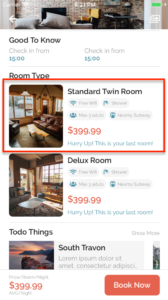
Usage
let item = {
    image: require("@assets/images/hotel-01.jpg"),
    name: "Boston Hotel",
    price: "$125",
    available: "Only 1 rooms leave",
    services: [
        { icon: "wifi", name: "Free Wifi" },
        { icon: "coffee", name: "Free Coffee" },
        { icon: "bath", name: "Free Bath" },
        { icon: "car", name: "Free Car" },
        { icon: "paw", name: "Free Paw" },
        { icon: "futbol", name: "Free Futbol" }
    ]
}

<RoomType
    image={item.image}
    name={item.name}
    price={item.price}
    available={item.available}
    services={item.services}
    style={{ marginTop: 10 }}
    onPress={() => {
        this.props.navigation.navigate(
            "HotelInformation"
        );
    }}
/>
Props
style
Type: StyleProp
Customize CSS style ViewStyle
image
Type: String | Required
Path of image display on card
name
Type: String | Required
Hotel name
price
Type: String | Required
Pricing of item include unit
available
Type: String
Just string for showing any purpose. Example: Only 4 rooms leaft
services
Type: Array[{icon, name}, ….]
List of icon and name.
Icon: String (icon name of FontAwesome)
Name: String
onPress
Type: String
Function to execute on press hotel item